sentinel
Creating a monitor
One monitor per database you back up.
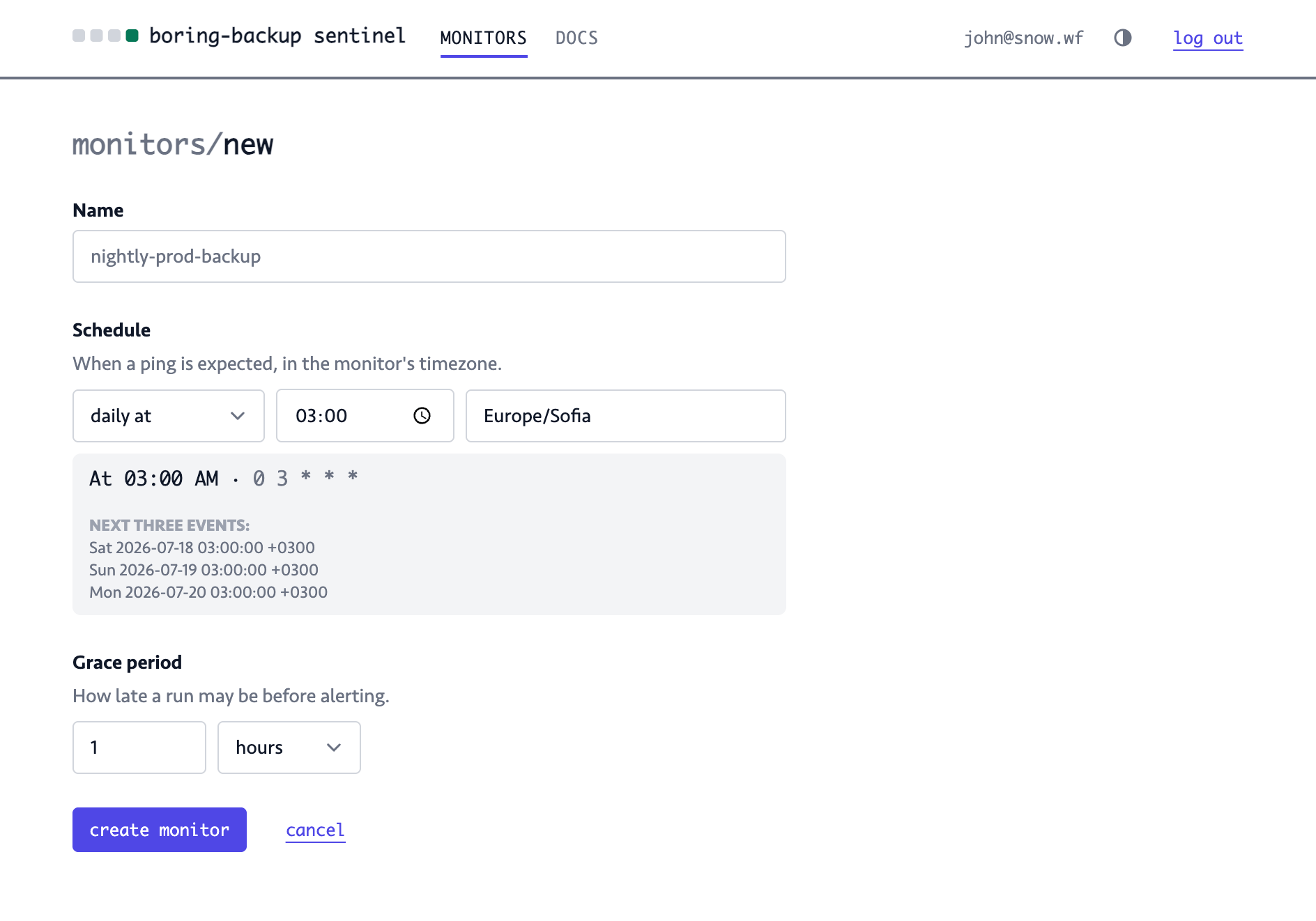
A monitor has three fields:
- Name - an identifier for the monitor.
- Schedule - when the backup should be expected. You should line this up with the execution time of the backup command. For example, if you execute the backup at 03:00, set the same time in this field.
- Grace period - how much time the monitor will wait after the "Schedule" time to trigger an alert. This should be long enough to allow the backup to complete.
Schedules are cron expressions
You are encouraged to use the existing presets for the "Schedule" field but if they don't work for you, you can just type a cron expression yourself.
0 3 * * *      # every day at 03:00
0 3 * * 1-5    # weekdays at 03:00
0 */6 * * *    # every six hours
The live explainer will show the next three runs, so make sure it looks correct.
Timezones and DST
It's important to select the correct time zone to match the time zone used by the machine where the backup will be executed. If there's a missmatch, backup and the schedule might not line up correctly and produce a false negative alert.
Grace period
Grace period should generally be as long as it takes for the backup to complete with some additional leeway to allow for unexpected factors. For example, a network issue might make the upload slower. Make note of the average backup runtime and double it.